 Made by Minh (Mark) Pham
See what a dbt change did to the data, one CTE at a time.
Open a model’s diff in VS Code and click above any CTE. Preview its rows on either side, or compare both sides and get the rows only one of them returns. Queries run through dbt show, so Jinja, refs and your warehouse profile work as in a real run.
ext install MarkPhamm.cte-diff
orders model. One where in payments, and order_payments returns different totals without a changed character. Move your mouse over it to take control. Edit the queries in the playground.- Preview a CTE▶ Preview above
payments - Compare both sides⇄ on
order_payments: 3 rows changed - From the sidebar⇄ on
final: a column added, one dropped
Both sides of a diff, two files, another branch
Silent. 37 seconds.
A diff shows what the SQL changed. It can’t show what the data did.
Checking it by hand means copying both versions into a worksheet, rendering the Jinja and writing the except yourself, CTE by CTE.
cte-diff marks every CTE that reads a changed one, and runs any CTE on both sides: from a diff, the sidebar, two SQL files, or another branch.
| CTE | The SQL diff shows | The data did |
|---|---|---|
| orders | no change | same 8 rows |
| payments | + where status = 'success' | 3 of 12 rows gone |
| order_payments | no change | 3 of 8 totals changed↓ reads a changed CTE |
Preview your working tree
-- models/orders.sql, HEAD ↔ working tree
payments as (
    select * from {{ ref('stg_payments') }}
    where status = 'success'
),
- Click orders.sql in Source Control. HEAD opens on the left, your edits on the right.
- Click ▶ Preview above
paymentson the left: 12 rows. - Click it on the right: 9 rows. Or ⇄ Compare sides for the rows only one side has.
// settings.json: VS Code hides lenses in diffs by default.
// CTE Diff offers to set this the first time a SQL diff opens.
"diffEditor.codeLens": true
Without it, ⇄ Compare a CTE… in the editor’s title bar and the sidebar work the same.
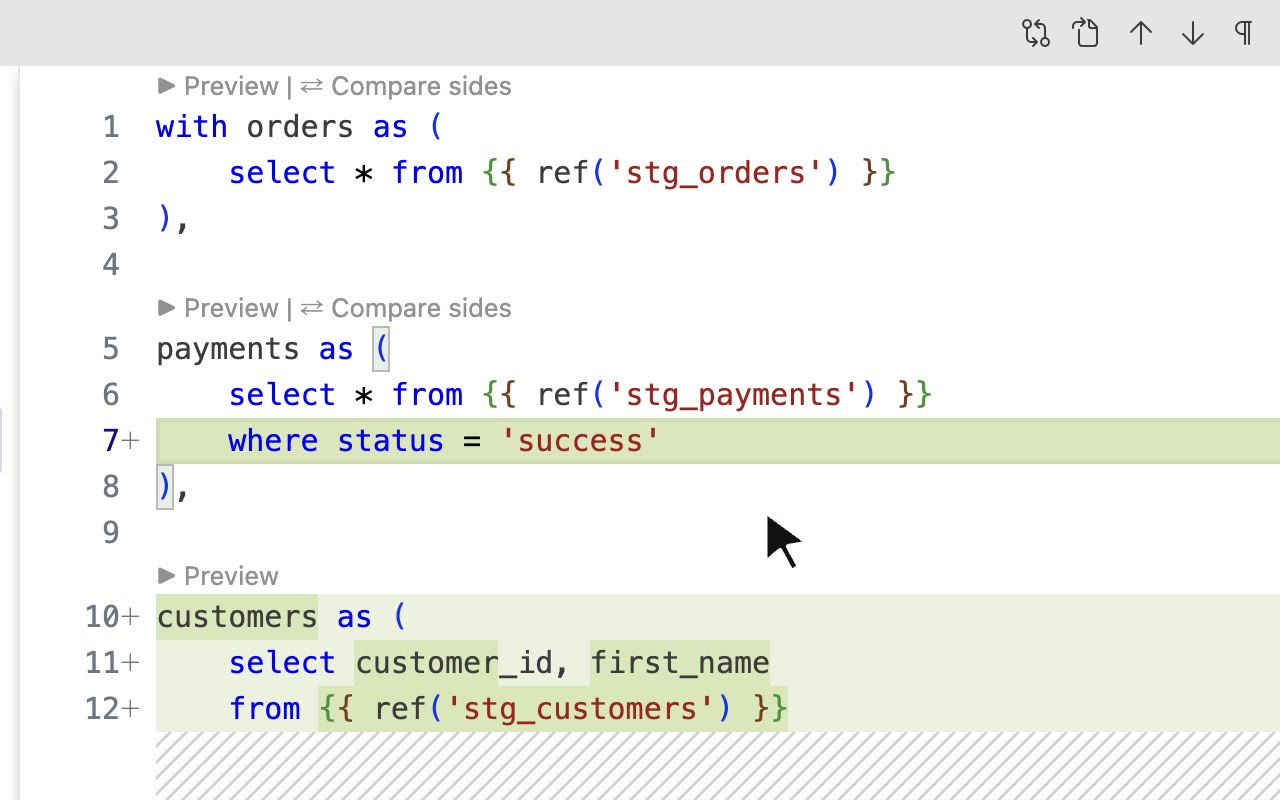
payments 12 rows on HEAD → 9 in the working tree
The new where drops three failed payments.
+ where status = 'success'
▶ Preview runs one CTE through dbt show, on either side of the diff. dbt Power User’s Execute CTE only runs on the right.
Compare two files
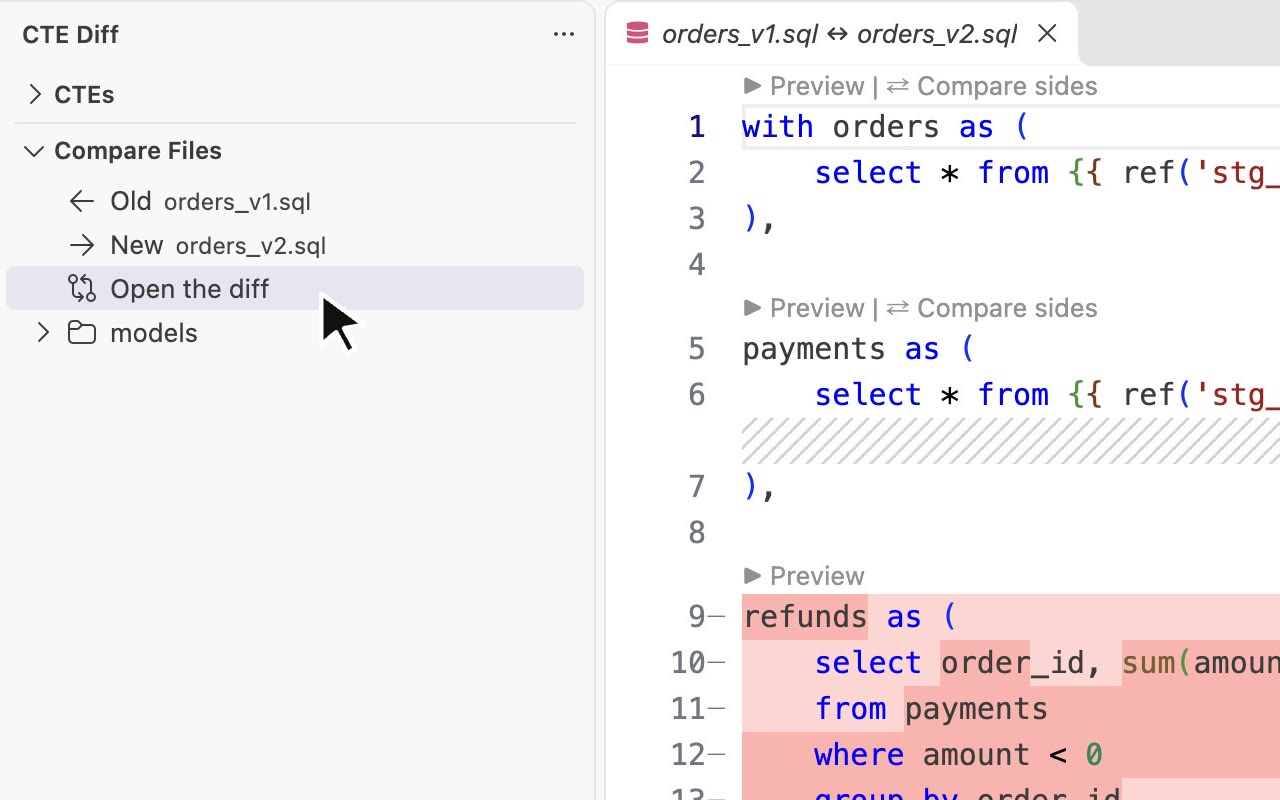
payments ⇄ 3 rows only in the old file
Left 12 rows, right 9. The three failed payments.
| order_id | payment_id | amount | status | |
|---|---|---|---|---|
| − | 52 | 7 | 15 | fail |
| − | 14 | 3 | 8 | fail |
| − | 87 | 11 | 9 | fail |
-- Old: the logic in production
payments as (
    select * from {{ ref('stg_payments') }}
),
-- New: your copy
payments as (
    select * from {{ ref('stg_payments') }}
    where status = 'success'
),
- In the sidebar’s Compare Files, hover orders_v1.sql and click ← to make it Old.
- Hover orders_v2.sql and click → to make it New.
- Click Open the diff, then ⇄ Compare sides above
payments.
Two paths, not two versions of one: a dev copy against prod’s, or a rewrite against the original. No file at all? CTE Diff: New Comparison takes two pasted queries.
Check against another branch
- On
dev, hover orders.sql in Compare Files and click ⑂. Or click Compare with Branch… in the sidebar’s title bar. - Pick
qa. orders.sql (qa) ↔ orders.sql opens. - Click ⇄ Compare sides above
order_payments.
Compare orders.sql with a branch
qa               last used, first
main
origin/main      remote, as of your last fetch
origin/qa
Local branches, then remote ones. The branch you’re on and tags are left out.
- The left side is the branch’s latest commit, not the commit your branch forked from.
- The right side is your working tree, uncommitted edits included.
- Both run on your one dbt target, so the comparison shows what the SQL changed, not what QA’s tables hold.
order_payments ⇄ 3 changed rows
Its SQL didn’t change. It reads payments, which did.
| order_id | total_amount on qa | on dev |
|---|---|---|
| 14 | 32 | 24 |
| 52 | 45 | 30 |
| 87 | 18 | 9 |
Working on dev and merging into qa? See what the merge does to the data before you open the pull request.
How ⇄ Compare sides finds the rows that changed
It runs the CTE on both sides in one query, through dbt show, and keeps only the rows one side has. Here it is on order_payments from the demo.
-
1
Run the CTE on both sides
The old and the new
order_payments, each with the CTEs it reads.− old order_id total_amount 11 18 14 32 52 45 87 18 + new order_id total_amount 11 18 14 24 52 30 87 9 -
2
Match rows by column name
Each row becomes text keyed by column name. Column order doesn’t matter, and a renamed or dropped column shows up as a difference, not an error.
- −
{"order_id":11,"total_amount":18} - −
{"order_id":14,"total_amount":32} - −
{"order_id":52,"total_amount":45} - −
{"order_id":87,"total_amount":18} - +
{"order_id":11,"total_amount":18} - +
{"order_id":14,"total_amount":24} - +
{"order_id":52,"total_amount":30} - +
{"order_id":87,"total_amount":9}
- −
-
3
Keep what only one side has
Rows on both sides drop out. What’s left is the change: each old row above its new one, matched on
order_id.order_id total_amount 3 changed rows − 14 32 + 14 24 − 52 45 + 52 30 − 87 18 + 87 9
BigQuery, DuckDB, Redshift or Snowflake, one query, one dbt show run. It compares distinct rows: if only duplicates changed, the row counts differ but no rows are listed (Redshift has no row counts). Read how the comparison works
Before you install
- dbt
- dbt Fusion, or dbt-core 1.5 or later, with a working profile. Key-pair, SSO and password logins all work. A project
.envis loaded first. - Warehouse
- Previews work on any warehouse dbt supports. Comparisons run on BigQuery, DuckDB, Redshift and Snowflake.
- Workspace
- A trusted one: dbt runs the project’s macros.
Install cte-diff and open your next review
ext install MarkPhamm.cte-diff